BFC separates commissioning, real-time automation, persistence, and visualization. Components communicate over a Docker bridge network on the Linux controller, while the Setup Tool manages that controller remotely over SSH.
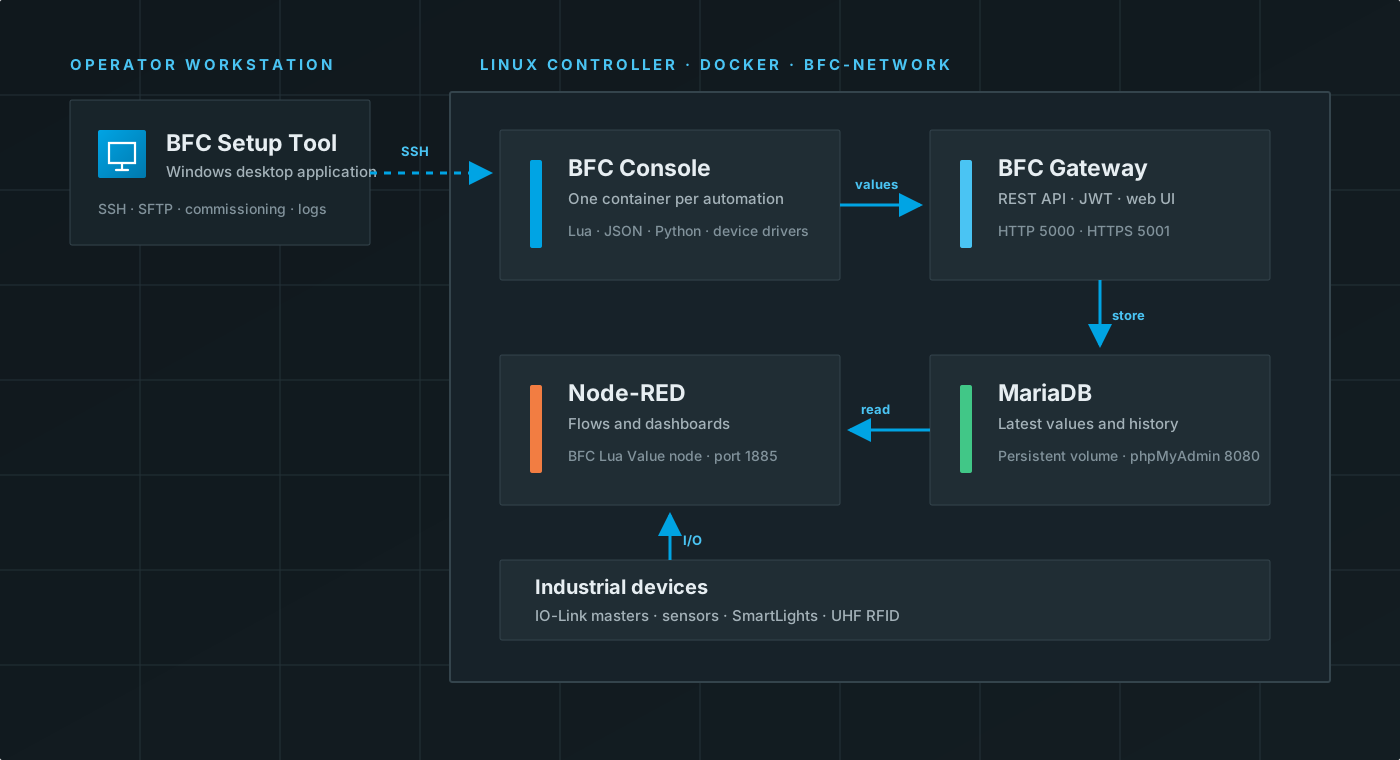
Workstation
The BFC Setup Tool runs on the operator workstation. It uses:
- SSH for remote commands.
- SFTP for image, package, and script workspace uploads.
- The remote Docker socket, accessed through
curl, to list containers, images, volumes, and networks.
The Setup Tool does not need a Docker daemon on the workstation.
Linux controller
The current commissioning workflow creates these Docker resources:
| Resource | Purpose |
|---|---|
bfc-network |
Private bridge network shared by BFC services |
bfc-mariadb |
Stores latest values, history, users, and tag data |
bfc-phpmyadmin |
Browser-based database administration |
bfc-gateway |
REST API, authentication, migration, and web pages |
bfc-nodered |
Flow editor and visualization runtime |
BFC-{script} |
One BFC Console container per uploaded automation |
MariaDB and Node-RED use named Docker volumes, so their data survives container replacement.
Automation data path
A BFC Console container mounts a private copy of the release _volumes directory at /mnt/fog. From Lua, an automation can:
- Connect to a Balluff IO-Link master or another supported device.
- Read process data or ISDU parameters.
- Control supported devices such as SmartLights or UHF heads.
- Publish typed values to
bfc-gateway:5000. - Repeat the logic until a stop is requested.
The Gateway stores both the latest typed value and its history in MariaDB. Node-RED then reads the latest value by source name, key name, and type.
Names inside and outside Docker
Containers on bfc-network use Docker DNS names:
http://bfc-gateway:5000
A browser or application outside the controller uses its host address:
http://CONTROLLER_IP:5000
Using localhost inside Node-RED or a BFC Console container points back to that same container, not to the Gateway.
Script isolation
Every uploaded automation receives:
- Its own container and process.
- Its own remote workspace under
~/.bfc/containers/CONTAINER_NAME. - A complete uploaded
_volumestree. - An
unless-stoppedrestart policy.
This lets automations be started, stopped, logged, and removed independently.