BFC is a container-based automation platform for connecting industrial devices, running local scripts, storing measurements, and presenting data through an API or Node-RED. This guide covers the current preview release of:
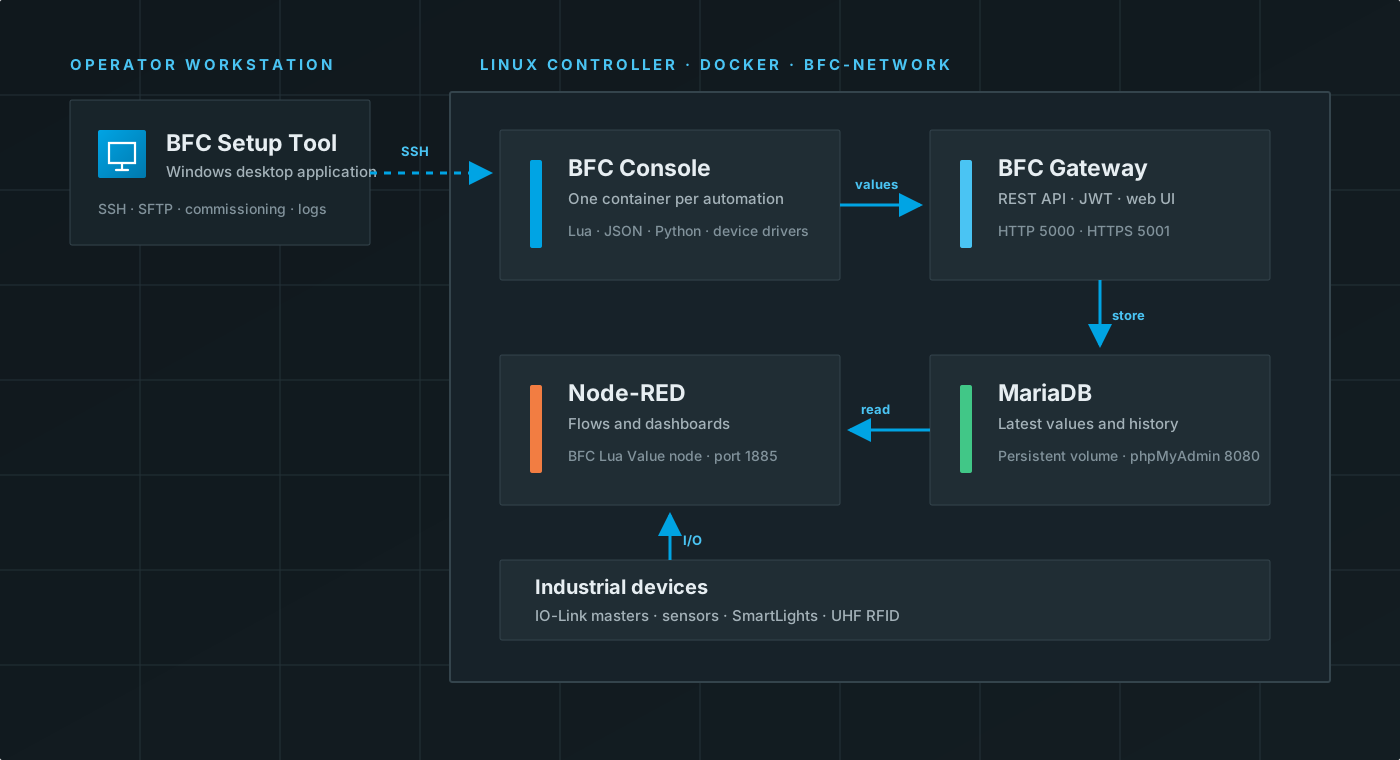
- BFC Setup Tool — commissions and operates a remote Linux controller over SSH.
- BFC Console — runs Lua, JSON, or Python automation against IO-Link devices and other supported hardware.
- BFC Gateway — stores Lua values and RFID tag data in MariaDB and exposes them through an authenticated REST API.
- BFC Node-RED node — reads the latest Lua values from the Gateway into a flow.
Recommended path
If this is your first installation, follow these pages in order:
- Read the system requirements.
- Complete the quick start.
- Commission the controller.
- Run a Lua automation.
- Connect Node-RED.
What you can build
A typical automation reads process data from an IO-Link master, applies local logic in a Lua loop, sends selected values to the Gateway, and exposes those values to Node-RED:
IO-Link device → BFC Console/Lua → BFC Gateway → MariaDB
                       └────────────→ actuator
                                     Gateway → Node-RED → dashboard
Each automation runs in its own BFC Console container. The Setup Tool uploads the script workspace, starts the container, shows live logs, and lets an operator stop or restart it.
Preview status
Important: This is first-version software. The current build contains development credentials and networking defaults that must not be exposed to an untrusted network. Read Security and current limitations before using the system outside a controlled test environment.
The documentation describes behavior present in the reviewed FogComputing, BFC.SetupTool, and node-red-bfc-gateway source trees. Features described as planned in older project notes are intentionally omitted.